
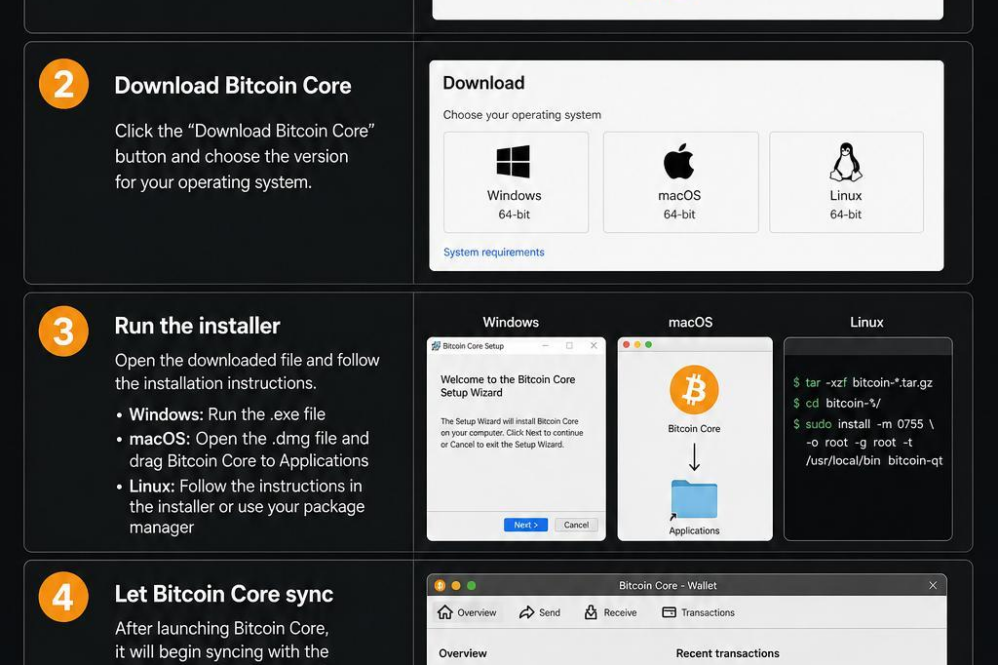
Begin by navigating to the official Bitcoin Core website to ensure you download the legitimate and latest version of the software. Select the appropriate installer based on your operating system-whether it’s Windows, macOS, or Linux. Download times may vary depending on your internet connection, so be patient as the file typically ranges from 70 to 120 MB.
Once the download completes, run the installer and carefully follow each on-screen prompt. When prompted, choose the directory where you want the blockchain data and wallet files to be stored. Ensure this location has sufficient disk space-currently, over 400 GB is recommended, and this will increase as the blockchain grows. After installation, launching Bitcoin Core will initiate the synchronization process; this can take several hours to days depending on your hardware and network speed, as it downloads the full blockchain.
- Verify the signature of the installer before running to avoid tampered files.
- Regularly back up your wallet.dat file to secure your funds.
- Keep your software updated to benefit from the latest security features.

Create your Nostr Profile