
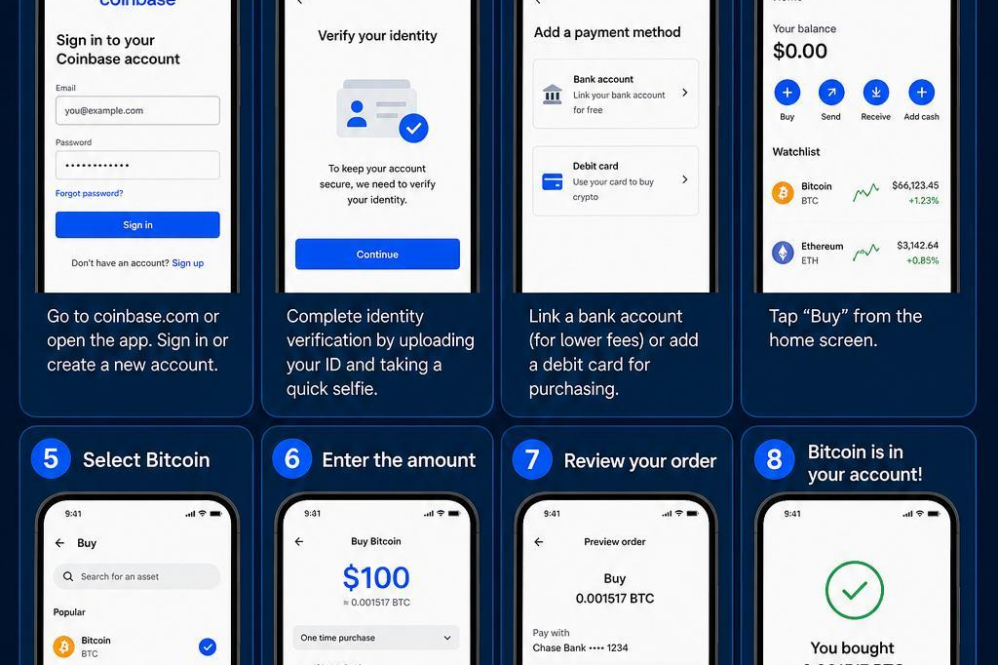
To begin purchasing Bitcoin on Coinbase, start by creating a verified account. Visit the Coinbase website or download their mobile app, then provide your email, create a password, and verify your identity by submitting necessary documents such as a driver’s licence or passport. This step is crucial to comply with regulations and secure your account.
Once your account is set up, link a payment method. Coinbase supports various options including bank accounts, debit cards, and wire transfers. Keep in mind that each method has different processing times and fees,so choose the one that best suits your needs. After setting up the payment, navigate to the “Buy/Sell” section, select Bitcoin, enter the amount you wish to purchase, and review the transaction details carefully before confirming your purchase.
| Payment Method | Fees | Processing Time |
|---|---|---|
| Bank Account | Low | 2-5 Business Days |
| Debit Card | Higher | Instant |
| Wire Transfer | Medium | 1-3 Business Days |
After confirmation,your Bitcoin will be credited to your Coinbase wallet. For enhanced security, consider transferring your holdings to a private wallet that you control.Regularly monitor your account and enable two-factor authentication to protect your funds from unauthorized access.

Create your Nostr Profile