
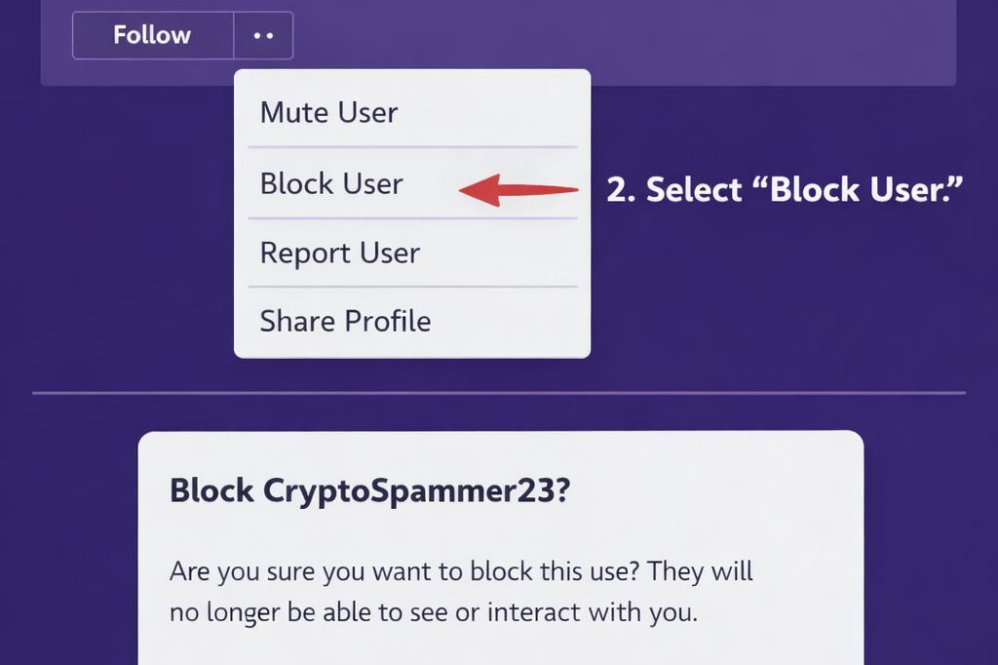
While Nostr is designed to promote open and censorship-resistant dialog, it also respects users’ need for control over their interactions.Blocking unwanted accounts is an essential feature for maintaining a positive experience on the platform. To block someone, you typically need to use a client that supports this functionality, as Nostr itself is a protocol rather than a centralized service.
here are the general steps to block a user on most Nostr clients:
- Locate the user’s public key or profile you want to block.
- Navigate to the blocking or user management section within your client.
- Add their public key to your block list.
Once blocked, posts and interactions from that user will be hidden or restricted based on your client’s capabilities, allowing you to curate your timeline more effectively.Keep in mind, because Nostr is decentralized, blocking a user only affects your experience and dose not prevent that user from seeing or posting on the network.
| Action | Description | Impact |
|---|---|---|
| Block User | Stops posts and notifications from blocked public keys | Improved feed relevance and reduced spam |
| Unblock User | Removes the block to resume normal interaction | Access to the user’s posts and replies restored |
| Report Abuse | Flag user activity to Nostr relay or client moderators | Potential suspension or warnings if applicable |
Create your Nostr Profile